Most desk accessories are bought on impulse and end up in a drawer. The ones that stay on the desk solve a specific problem: a cable that keeps snagging, a headset with nowhere to go, a laptop with too few ports, a camera that makes you look like you are calling from a cave. This guide sorts common accessories by the problem they fix, so you can buy for your setup instead of for a picture of someone else's.
Step one: list what annoys you
Sit at your desk for a normal session and note every small friction. Typical ones:
- The headset lives on the keyboard or the floor.
- A laptop has one or two USB-C ports, and you need a monitor, a mouse receiver and a charger at the same time.
- The mouse cable drags, or the wireless mouse dies mid-game.
- Video calls are dark or grainy.
- The wall behind the monitor is dark, and the bright screen stands out harshly at night.
Buy for the items on that list. Skip the rest.
A place for the headset
A headset left on the desk gets knocked off, sat on or tangled in cables. There are two common fixes:
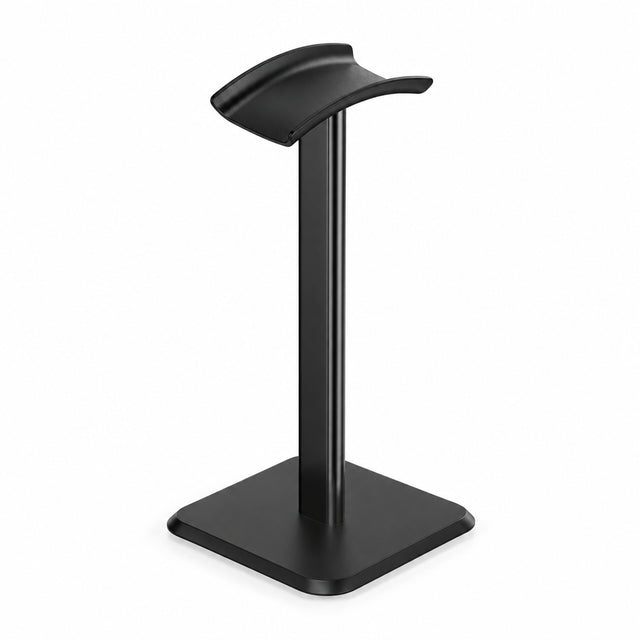
- A desktop stand. It takes a small footprint and keeps the headset at hand. Look for a base wide or heavy enough that it does not tip when you lift the headset off, and a top that does not press a hard edge into the headband.
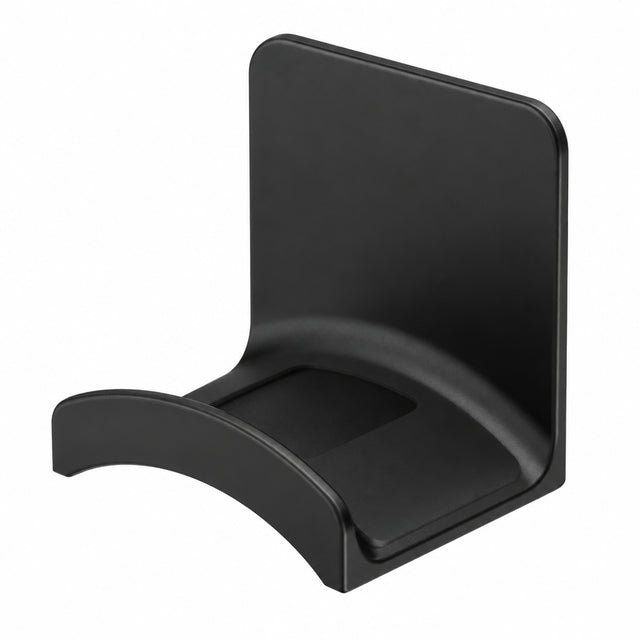
- An under-desk or wall hook. It takes zero desk space. Adhesive hooks depend on a clean, smooth surface, so follow the mounting instructions and check the weight it is meant to hold.
We list a Viesrita universal headphone stand for the desktop option and an adhesive under-desk headphone hanger for the hook option. All our stands and holders are in Headphone Stands.
More ports from one: USB-C hubs
Many thin laptops have only USB-C ports. A hub turns one port into several. When you compare hubs, read these specs:
- Power pass-through (PD). Lets you charge the laptop through the hub. The hub keeps some power for itself, so the laptop receives less than the charger's rating. Check that the pass-through figure is enough for your laptop.
- HDMI resolution and refresh rate. "4K" alone is not enough information. 4K at 30 Hz works for documents but feels choppy for games and fast scrolling. 4K at 60 Hz needs both the hub and the laptop's port to support it.
- USB data speed. USB 3.0 (also called 5 Gbps) ports are fine for drives and receivers. USB 2.0 ports are slower and fine for keyboards and mice.
- Extras. Ethernet for a stable wired connection, SD card slots for cameras.
Check your laptop maker's documentation to see whether its USB-C port supports video output. Not every USB-C port does. We list a 3-in-1 USB-C hub with HDMI (4K at 30 Hz), one USB 3.0 port and a USB-C PD charging port rated up to 100 W. Hubs are in Hubs and Docks.
A mouse that fits the way you use it
For general use and casual games, the specs that matter most are connection, shape and battery:
- Connection. A 2.4 GHz receiver gives a dedicated link to one computer. Bluetooth needs no receiver and is handy for tablets and laptops with few ports. Dual-mode mice do both and let you switch between two devices.
- DPI. DPI sets how far the pointer moves for each inch of mouse movement. Higher is not automatically better. Most people use a moderate setting, and an adjustable DPI button is more useful than a big maximum number.
- Battery. A rechargeable mouse with USB-C charging saves buying AA batteries. Battery life figures are the maker's estimates and drop with RGB lighting on.
- Shape and buttons. Hand size and grip matter more than any spec. Side buttons help in browsers and games.
We list the LYBYU rechargeable wireless mouse, which connects by Bluetooth or 2.4 GHz wireless and runs at 1600 DPI. It is an everyday mouse, not an esports model. If you play competitive shooters at a high level, look for a mouse built and specified for that use. It is in Computer Mice.
A webcam for calls and streaming
A laptop's built-in camera is often the weakest part of a desk setup. An external webcam lets you place the camera at eye level on top of the monitor, which is usually more flattering than a camera looking up from a laptop on the desk.
- Resolution. 1080p is enough for most video calls. Many call apps compress video anyway.
- Light matters more than resolution. Any webcam looks grainy in a dark room. A lamp or light in front of you, not behind you, makes the biggest difference.
- Microphone. A webcam's built-in microphone is fine for calls. For streaming or gaming chat, a headset microphone sits closer to your mouth and usually sounds clearer.
- Privacy. A physical cover or a camera you can unplug gives you control when you are not on a call.
We list the OPUYYM mini USB webcam with a built-in microphone, in 480p or 720p. At these resolutions it suits everyday video calls rather than streaming in high resolution. See Webcams for the range.
Bias lighting behind the screen
A strip of light behind a monitor or TV, often called bias lighting, softens the contrast between a bright screen and a dark wall. Some people prefer it for evening gaming and watching. It is a comfort preference, not a treatment for anything. Things to check:
- Power. 5 V USB strips can run from a USB port or a phone charger. Some monitors and TVs have a USB port that can power them.
- Length. Measure the back of the screen before you buy. Strips meant to be cut must be cut only at the marked points.
- Color and dimming. A white strip with a dimmer is simple and works well as bias lighting. RGB strips with remotes are more for decoration.
- Adhesive. Clean the surface first. Heat from the back of some screens can weaken adhesive over time.
We list the Saimili 1 m USB COB LED strip with a touch dimmer, a 5 V strip. Our other lamps are in Lighting.
Cable management
Cables are the cheapest thing to fix. Reusable hook-and-loop ties, an under-desk tray and a few adhesive clips solve most of the mess. Leave some slack so cables are not pulled tight at the connectors, and keep chargers and power strips off the floor where they can get kicked or wet.
Things that rarely help
- Accessories bought to match a color scheme rather than a need.
- Specs that sound big but do not apply to you, such as a very high DPI ceiling on a mouse you use for browsing.
- A hub with more ports than you will ever plug in, if it costs you the power pass-through or display output you actually need.
Before you order
Wireless accessories such as mice and headsets should carry an FCC ID, which you can check in the FCC ID search. Check delivery times on our shipping page if you are building a setup for a specific date, and see our returns policy if you want to know how returns work before you buy.
Sources
- USB Implementers Forum, USB Charger (USB Power Delivery)
- Federal Communications Commission, FCC ID Search